Learn PostScript
Where the language came from, and how to write it: a short history, then a tutorial you can run as you read.
PostScript is a programming language for describing pages. A PostScript
file is not a picture of a page. It is a program that draws the page when
something runs it: a printer, a viewer, or an interpreter such as pscat. This
page has two parts. The first tells how the language came about and where it
went. The second teaches it, from 3 4 add to a complete drawing.
Every example in the tutorial has a Try it link that opens it in the
playground, where you can change it and run it
again.
Part 1: A short history
The numbers in brackets point to the sources at the end of this part. The main one is John Warnock's own account of how the language came about [1].
Before PostScript: a stack machine and JaM
The story starts in 1974 at Evans & Sutherland, a computer graphics company. John Warnock managed a small group that had one year to build a 3D model of New York Harbor for a ship simulator. One of the group, John Gaffney, suggested a small interpreted language for entering the model's data, and they called it Joy. It worked so well that Warnock, Gaffney and Paul Zima went on to build a fuller language, the Design System. It ran on an imaginary stack machine, it had dictionaries, and it had three stacks: operand, execution and dictionary. All three survive in PostScript. It was built on a PDP-11 between 1975 and 1978 and had almost everything PostScript would need except the graphics operators [1].
In 1978 Warnock joined Xerox's Palo Alto Research Center (PARC), in Chuck Geschke's new Imaging Sciences Laboratory. There he rebuilt the same kind of interpreter with Martin Newell and Doug Wyatt, and called it JaM, for "John and Martin". To JaM they added an imaging model: shapes made of straight lines and cubic Bézier curves, filled or outlined, along with text, images and clipping [1]. Warnock and Wyatt described the model in a 1982 SIGGRAPH paper [13].
From 1979 Warnock and Geschke worked with Butler Lampson, Bob Sproull, Brian Reid and Jerry Mendelson on Interpress, a printing protocol for Xerox. Xerox adopted it, but only on condition that it stay unpublished until every Xerox printer used it. Warnock and Geschke were convinced it would never succeed that way, and they decided to leave and start a company [1].
Adobe and PostScript (1982–1984)
Warnock and Geschke founded Adobe Systems on 2 December 1982. They named it after Adobe Creek, which ran down the street from Warnock's house. The first plan was to build complete document systems for businesses, around a language based on JaM. With the engineers Doug Brotz, Bill Paxton and Ed Taft, that language became PostScript [1].
In May 1983 Steve Jobs called them. Apple was finishing the Macintosh, wanted a laser printer to go with it, and was interested in a partnership. Because PostScript was a full programming language, the converter from the Mac's QuickDraw graphics to PostScript could itself be written in PostScript and live in the printer's memory. Adobe changed its plan: it would provide the software between personal computers and the new laser printers, instead of whole systems [1].
One hard problem remained: text. A letter drawn straight from its outline looked bad at the low resolutions of screens and laser printers. Warnock's idea was to adjust each outline to the device's pixel grid before filling it, and he worked it out with Brotz and Paxton. Adobe kept the method a trade secret rather than patent it. Adobe announced PostScript in 1984 [1], and it reached customers the following year, inside the first PostScript printer [3]. In 2022 the Computer History Museum published the source code of a very early version, from late February 1984 [2].
The LaserWriter and desktop publishing (1985)
The first PostScript printer was Apple's LaserWriter, introduced at the start of 1985 [3][4]. The same year Aldus released PageMaker, a page-layout program for the Macintosh. PageMaker used the Mac's graphical interface, PostScript and the LaserWriter together, and the Computer History Museum dates the start of the desktop publishing revolution to its release [3][5].
A PostScript program describes the page, not the dots of one printer, so the same document has to come out right on a 300-dot-per-inch laser printer and on a 1,200-dot-per-inch imagesetter, the machine a typesetter uses to put pages on film [1]. In 1985 Linotype released the Linotronic 100 and 300 imagesetters with PostScript, and their output compared well with traditional typesetting equipment [3]. Besides Apple and Linotype, Adobe signed DEC, Wang, QMS and Compugraphic, then IBM in 1986, after which Hewlett-Packard licensed PostScript for its printers too [1].
Fonts: Type 1, Type 3 and TrueType
PostScript has two main kinds of outline font. A Type 3 font draws each letter with ordinary PostScript procedures, so anyone can write one [6]. A Type 1 font is more compact and carries hints, notes about each letter's shape that the interpreter's special rasterizer uses to make text look good at small sizes and low resolutions. Type 1 fonts are also encrypted [7].
Apple developed an outline font format of its own, TrueType, designed to avoid paying per-font royalties to the owners of other font technologies and to get past some limits of Type 1. Apple agreed to license it to Microsoft [8], and the two companies announced a joint plan to support it [3]. In 1989 Adobe released Adobe Type Manager, which drew Type 1 fonts smoothly on screen, and made the Type 1 format an open standard [3]; its specification was published as a book in 1990 [7]. TrueType shipped in Apple's System 7 in May 1991 and in Microsoft Windows 3.1 in April 1992 [8]. This contest between the formats is often called the font wars.
Display PostScript
In 1988 Adobe introduced Display PostScript, which applies the same imaging model to computer screens, so that what is on screen matches what prints [3]. NeXT's operating system, NeXTSTEP, used it: its programming manuals give Display PostScript a chapter of its own [12]. The second edition of Adobe's reference manual documented the Display PostScript extensions, and the third edition took them out again [6].
Language levels 1, 2 and 3
The language grew in three steps, which Adobe calls LanguageLevels. Each
level includes everything in the levels before it
[6]. LanguageLevel 1 is the original
language, as it first shipped in 1985 [3]. Level 2
was released in 1990, adding support for colour separations among much else
[3]. LanguageLevel 3 is documented in the
third edition of the PostScript Language Reference, published in
1999, where Adobe calls its matching printer software Adobe PostScript 3
[6]. Each level has its own edition of the
manual. The << >> dictionary syntax used in the
tutorial below is one of Level 2's additions
[6].
EPS: PostScript inside other documents
An Encapsulated PostScript (EPS) file is a PostScript program that
describes a single page and is meant to be placed inside another document,
like a logo in a brochure or a chart in a report. It is ordinary PostScript
with a few restrictions, and it must give the size of what it draws in a
%%BoundingBox comment. Adobe's specification of the format
reached version 3.0 in 1992 [9]. The
tutorial's drawing examples carry the same comment, which is how the
playground knows what size to make the page.
PDF, PostScript's descendant
Adobe released Acrobat 1.0, and with it the Portable Document Format (PDF), in 1993 [3]. The PDF standard states the family tie itself: at the core of PDF is an imaging model derived from PostScript, but where PostScript is a programming language, PDF is a structured file format, designed to be fast to view on screen [10]. In 2008 PDF 1.7 became the international standard ISO 32000-1 [10]. Warnock calls PDF a derivative of PostScript, and credits the two together with transforming printing and publishing around the world [1].
PostScript today
Most documents now travel as PDF, but PostScript is still around. Ghostscript, the open-source PostScript and PDF interpreter, is still developed, and pscat checks its own output against it. Type 1 fonts are fading: Adobe's applications stopped supporting them after January 2023, though Adobe still supports CFF, a compact form of Type 1 used inside OpenType fonts [11]. And the language is still a good way to draw with code, which is what the rest of this page is about.
Reading list
- John E. Warnock, "The Origins of PostScript", IEEE Annals of the History of Computing 40:3 (2018) [1]. The story above, from the man who started it.
- David C. Brock, "PostScript: A Digital Printing Press", Computer History Museum (2022) [2]. A readable history, with the early source code.
- Adobe Systems, PostScript Language Tutorial and Cookbook (Addison-Wesley, 1985). Adobe's original introduction, full of small programs. It covers Level 1 only.
- Glenn C. Reid, Thinking in PostScript (Addison-Wesley, 1990). How to write PostScript well, not only correctly.
- Adobe Systems, PostScript Language Reference, third edition (Addison-Wesley, 1999) [6]. The authority on every operator.
- Pamela Pfiffner, Inside the Publishing Revolution: The Adobe Story (Adobe Press, 2003). The company's history.
- The Computer History Museum's Desktop Publishing Pioneer Meeting (2017) [4]. Transcripts of people from Adobe, Apple, Aldus and elsewhere talking it over.
Sources
- John E. Warnock, "The Origins of PostScript", IEEE Annals of the History of Computing, vol. 40, no. 3, July–September 2018, pp. 68–76. doi:10.1109/MAHC.2018.033841112
- David C. Brock, "PostScript: A Digital Printing Press", Computer History Museum blog, 1 December 2022.
- Computer History Museum, Information Technology Corporate Histories Project, "Adobe Systems" (company timeline).
- Computer History Museum, Desktop Publishing Pioneer Meeting, Day 2, Session 7: Ventura, Aldus and Apple, recorded 23 May 2017 (transcript).
- Computer History Museum, "Desktop Publishing", in the exhibition Revolution: The First 2000 Years of Computing.
- Adobe Systems, PostScript Language Reference, third edition (Addison-Wesley, 1999): preface, sections 1.2, 3.2, 4.3 and 5.2, appendix D.
- Adobe Systems, Adobe Type 1 Font Format (Addison-Wesley, 1990): chapters 1 and 7.
- Microsoft, "A brief history of TrueType".
- Adobe Systems, Encapsulated PostScript File Format Specification, version 3.0, Technical Note #5002, 1 May 1992 (archived copy).
- ISO 32000-1:2008, Document management — Portable document format — Part 1: PDF 1.7, first edition, 1 July 2008 (Adobe's copy): introduction.
- Adobe, "PostScript Type 1 fonts end of support", last updated 11 July 2023.
- NeXT Computer, NeXTSTEP Programming Interface Summary, Release 3 (1993), chapter 5, "Display PostScript".
- John Warnock and Douglas K. Wyatt, "A Device Independent Graphics Imaging Model for Use with Raster Devices", Computer Graphics (SIGGRAPH '82), vol. 16, no. 3, 1982, pp. 313–319. doi:10.1145/965145.801297
Part 2: The fundamentals
Each example below shows a whole program, then what it does when it runs.
Press Try it to open it in the playground, change something, and press
Run. Everything after a % on a line is a comment. Two comments
appear at the top of many examples: %!PS marks the file as
PostScript, and %%BoundingBox: 0 0 300 200 gives the size of
the page, here 300 by 200 points.
Postfix and the operand stack
PostScript keeps its working values on a stack, a pile where the
last thing put on is the first taken off. A number in a program is pushed
onto the stack. An operator such as add pops its operands off
the stack and pushes its result. So the operands come first and the
operator last, which is called postfix notation: 3 4 add
leaves 7 on the stack. The operator == pops the top item and
prints it.
%!PS
% Operands first, then the operator. == prints the top of the stack.
3 4 add ==
2 3 4 mul add ==
2 3 add 4 mul ==7
14
20There are no parentheses and no precedence rules: the order of the words
is the order of the work. In 2 3 4 mul add, the
mul comes first, so 3 × 4 is worked out before the
addition.
pstack prints everything on the stack, top first, and leaves
it there. clear empties the stack. A few operators exist only to
rearrange the stack: dup copies the top item, exch
swaps the top two, and pop throws the top one away. Text in
parentheses, like (-- dup --), is a string, and =
prints a string without its parentheses.
%!PS
% pstack prints the whole stack, top first, without changing it.
1 2 3 pstack
clear
(-- dup --) =
5 dup pstack clear
(-- exch --) =
1 2 exch pstack clear
(-- pop --) =
1 2 pop pstack clear3
2
1
-- dup --
5
5
-- exch --
1
2
-- pop --
1Two more reach deeper into the stack. n index copies
the item n places below the top, counting the top as 0.
n j roll turns the top n items round by j
places: with 1 2 3 on the stack, 3 1 roll leaves
3 1 2, reading from the bottom up. Remember that
pstack prints the top first.
%!PS
(-- index copies the item n down, counting the top as 0 --) =
10 20 30 2 index pstack clear
(-- roll turns the top n items by j places --) =
1 2 3 3 1 roll pstack clear-- index copies the item n down, counting the top as 0 --
10
30
20
10
-- roll turns the top n items by j places --
2
1
3The three stacks
The interpreter keeps three stacks, the same three as Warnock's Design System in the 1970s.
- The operand stack holds data: the numbers, strings and other values you have been pushing.
- The dictionary stack decides what names mean. A dictionary is a
table of names and values. When the interpreter meets a name such as
addorx, it looks in the top dictionary first, then the next one down, and so on. The bottom of the stack always holdssystemdict, with the built-in operators, anduserdict, where your own definitions go; Level 2 interpreters add a third,globaldict, between them. - The execution stack holds the interpreter's own work: the procedures it is in the middle of running, and where to carry on in each. You rarely touch it directly, but it is what lets a procedure call another and then continue where it left off.
begin pushes a dictionary onto the dictionary stack and
end pops it off, so the same name can mean different things in
different places. def, explained in the next section, gives a
name a value in the top dictionary.
%!PS
% A name is looked up on the dictionary stack, top dictionary first.
/x 1 def               % defines x in userdict
2 dict begin           % push a new, empty dictionary
  /x 2 def             % this x lives in the new dictionary
  x ==                 % finds the newer x first
end                    % pop the dictionary again
x == % back to the outer x2
1Names and procedures
A name written with a slash, like /side, is a
literal name: it is pushed onto the stack as it is instead of being
looked up. def takes a name and a value and stores them in the
top dictionary. After that, the plain name side is looked up
and replaced by its value.
Code in braces, such as { dup mul }, is a procedure.
It does not run when it is read. Instead it is pushed as one object: an
array of instructions, marked as executable. Store one under a name with
def and the name works like a new operator. load
fetches a name's value without running it, and exec runs a
procedure that is on the stack.
%!PS
/side 50 def
side side mul ==
/square { dup mul } def    % a procedure is an executable array
7 square ==
/square load ==            % load fetches the value without running it
{ 1 2 add } exec == % exec runs a procedure that is on the stack2500
49
{dup mul}
3Names are looked up when a procedure runs, not when it is defined, so
redefining a name changes every procedure that uses it. bind
prevents that for operators: it swaps each operator name in a procedure for
the operator itself, once, when the procedure is defined. Bound procedures
also run a little faster, which is why real programs bind most of
theirs.
%!PS
/twice-bound { 2 mul } bind def   % bind looks mul up now
/twice-late  { 2 mul } def        % this one looks mul up every time
/mul { add } def                  % redefine mul (never do this for real)
5 twice-bound ==
5 twice-late ==10
7Control flow
Control flow is made of operators that take procedures as operands.
Comparisons such as gt (greater than), lt,
eq and ne push true or
false. if takes a boolean and one procedure, and
ifelse takes a boolean and two. for takes a start,
a step, a limit and a procedure, and runs the procedure once for each value
of a counter, pushing the counter first. repeat runs a
procedure a given number of times.
%!PS
5 3 gt ==                                  % comparisons push a boolean
5 3 gt { (bigger) } { (smaller) } ifelse =
1 1 4 { == } for                           % start step limit {proc} for
0  1 1 100 { add } for  ==                 % the sum 1 + 2 + ... + 100
3 { (hip hip) = } repeattrue
bigger
1
2
3
4
5050
hip hip
hip hip
hip hiploop runs a procedure over and over until exit
stops it. forall runs a procedure once for each element of an
array (written in square brackets) or a string, pushing the element each
time. Each character of a string comes out as its character code.
%!PS
/n 1 def
{ n 100 gt { exit } if  /n n 2 mul def } loop
n ==
[10 20 30] { 2 mul == } forall
(abc) { == } forall % a string gives character codes128
20
40
60
97
98
99Dictionaries and scope
Dictionaries are also ordinary data. n dict makes an
empty one with room for n entries, put stores a value
under a key, and get reads one back.
<< … >> builds a dictionary from pairs of keys and
values. Pushing a dictionary with begin makes its keys into
names you can use directly. That is the usual way to give a procedure local
variables: in hypot below, a and b
exist only between begin and end.
%!PS
/point 2 dict def
point /x 3 put
point /y 4 put
point /x get ==
point begin  x y add ==  end               % begin makes its keys names
<< /name (Ada) /born 1815 >> /born get ==  % << >> builds a dictionary
% Local variables: a procedure with its own dictionary.
/hypot {            % a b -> sqrt(a*a + b*b)
  2 dict begin
    /b exch def  /a exch def
    a a mul b b mul add sqrt
  end
} def
3 4 hypot ==3
7
1815
5.0Paths and painting
Drawing happens in two steps. First you build a path, an invisible
outline. newpath starts a fresh one, moveto sets
the current point, lineto adds a straight line to a new point,
and closepath joins the last point back to the first. Then you
paint it: stroke draws along the path with the current line
width and colour, and fill paints its inside. Painting uses the
path up, so the next one starts empty. setrgbcolor takes red,
green and blue, each from 0 to 1. showpage at the end sends the
finished page to the printer, or here, to the screen.
%!PS
%%BoundingBox: 0 0 300 200
% A path is invisible until you paint it.
newpath
40 40 moveto  140 40 lineto  90 150 lineto  closepath
4 setlinewidth
stroke                                  % paint the outline
0.2 0.6 0.9 setrgbcolor
170 40 moveto  260 40 lineto  260 130 lineto  170 130 lineto  closepath
fill                                    % paint the inside
showpage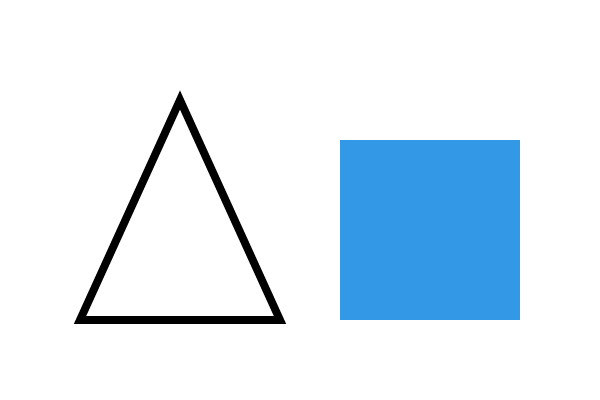
curveto adds a cubic Bézier curve: two control points that
pull the curve towards them, then the end point. arc adds part
of a circle, given its centre, its radius, and the start and end angles in
degrees. setgray picks a grey from 0 (black) to 1 (white).
Rectangles are common enough to have shortcuts: x y width height
rectfill fills one and rectstroke outlines one,
without touching the current path. Later examples use them.
%!PS
%%BoundingBox: 0 0 300 200
3 setlinewidth
% curveto: two control points, then the end point
30 40 moveto  60 190  130 -10  150 120 curveto
stroke
% arc: centre x y, radius, start and end angle in degrees
0.9 0.4 0.2 setrgbcolor
230 100 50 0 360 arc fill
1 setgray
230 100 25 30 330 arc stroke
showpage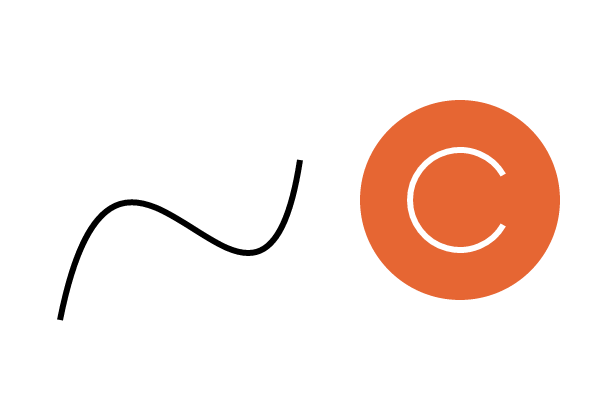
clip turns the current path into a stencil: everything
painted afterwards shows only inside it. Here a circle clips a set of
coloured stripes. Each stripe uses rlineto, which is like
lineto but measured from the current point: 0 200
rlineto means "200 straight up from here".
%!PS
%%BoundingBox: 0 0 300 200
% clip: later painting only shows inside the current path
newpath 150 100 80 0 360 arc clip
newpath
0 10 300 {                       % x = 0, 10, 20 ... 300
  dup 300 div 0.3 0.8 setrgbcolor
  0 moveto  0 200 rlineto  6 setlinewidth stroke
} for
showpage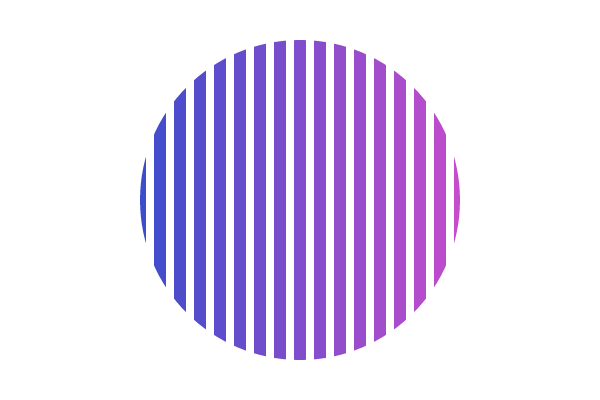
Coordinates
The page's origin, (0, 0), is at its bottom left corner, with x going right and y going up. One unit is 1/72 of an inch, about the same as a printer's point, so a US Letter page is 612 by 792 units [6].
You can move and turn the coordinate system itself. translate
moves the origin, rotate turns the axes counter-clockwise by a
number of degrees, and scale stretches them. Each one changes
the current transformation matrix, or CTM, which maps the
coordinates you write to the device's pixels. Each change builds on the ones
before it, which is why the loop below draws the very same bar each time and
only turns between bars.
%!PS
%%BoundingBox: 0 0 300 200
% One unit is 1/72 inch, and y goes up. This square is one inch wide.
20 20 72 72 rectfill
% translate moves the origin; rotate turns the axes (degrees, counter-clockwise)
200 100 translate
0.8 0 0 setrgbcolor
12 {
  20 -4 50 8 rectfill        % one bar, drawn in the turned axes
  30 rotate                  % each turn adds to the last one
} repeat
showpage
scale stretches everything drawn after it, including the
width of lines.
%!PS
%%BoundingBox: 0 0 300 200
% scale stretches the axes, and everything drawn after it, line widths too.
/box { 0 0 40 40 rectstroke } def
30 30 translate  box
70 0 translate  2 1 scale  box
0 50 translate  0.5 2 scale  box
showpage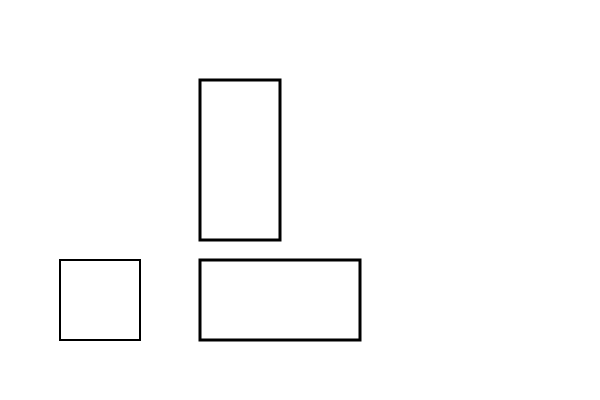
The graphics state
The current colour, line width, font, CTM, path and clipping region
together make up the graphics state. gsave saves a copy
of it, and grestore brings the saved copy back. Wrapping some
drawing in gsave … grestore lets it move, turn and
change colour without disturbing anything drawn after it.
%!PS
%%BoundingBox: 0 0 300 200
% gsave saves the graphics state; grestore brings it back.
0.1 0.5 0.3 setrgbcolor
gsave
  150 100 translate
  45 rotate
  0.9 0.2 0.2 setrgbcolor
  -40 -40 80 80 rectfill        % red, turned square
grestore
20 20 60 60 rectfill            % green again, and unturned
showpage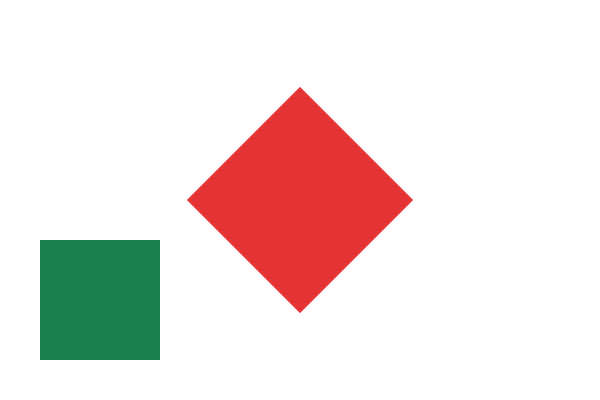
Text and fonts
To draw text, find a font by name with findfont, set its size
in points with scalefont, and make it current with
setfont. Then moveto where the line starts and
show a string. Letters are shapes like any other: they take the
current colour and turn with the axes.
%!PS
%%BoundingBox: 0 0 300 200
/Helvetica findfont 28 scalefont setfont
20 140 moveto (Hello, PostScript) show
/Times-Italic findfont 20 scalefont setfont
0.6 0.1 0.3 setrgbcolor
20 100 moveto (Text is just more paint.) show
gsave
  20 40 translate  15 rotate
  /Courier findfont 18 scalefont setfont
  0 0 moveto (turned with the axes) show
grestore
showpage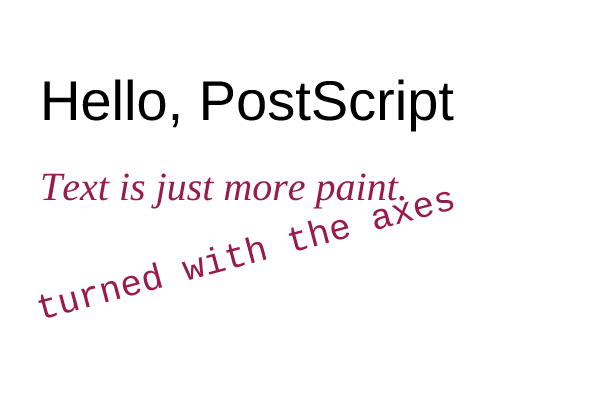
A Type 3 font is one you write yourself. It is a dictionary with a
few required entries and a BuildChar procedure, which the
interpreter calls to draw each character. This one draws every letter as a
dot that grows through the alphabet. definefont registers it
under a name, so that findfont can find it like any other
font.
%!PS
%%BoundingBox: 0 0 300 200
% A Type 3 font draws each character with an ordinary procedure.
/Dots 5 dict def
Dots begin
  /FontType 3 def
  /FontMatrix [0.001 0 0 0.001 0 0] def
  /FontBBox [0 0 700 700] def
  /Encoding StandardEncoding def
  /BuildChar {                    % font charcode -> draws one glyph
    exch pop                      % keep the character code
    700 0 setcharwidth
    350 350 3 -1 roll 96 sub 30 mul 0 360 arc fill
  } def
end
/Dots Dots definefont pop
/Dots findfont 48 scalefont setfont
20 70 moveto (abcdefg) show
showpage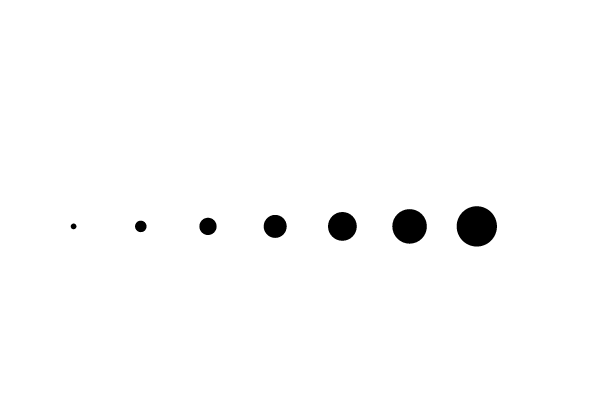
A complete program: a sunburst
Now put the pieces together, one step at a time. First move the origin to the centre of the page and draw a single ray.
%!PS
%%BoundingBox: 0 0 300 300
% Step 1: move the origin to the centre and draw one ray.
150 150 translate
0 0 moveto  130 0 lineto
4 setlinewidth stroke
showpage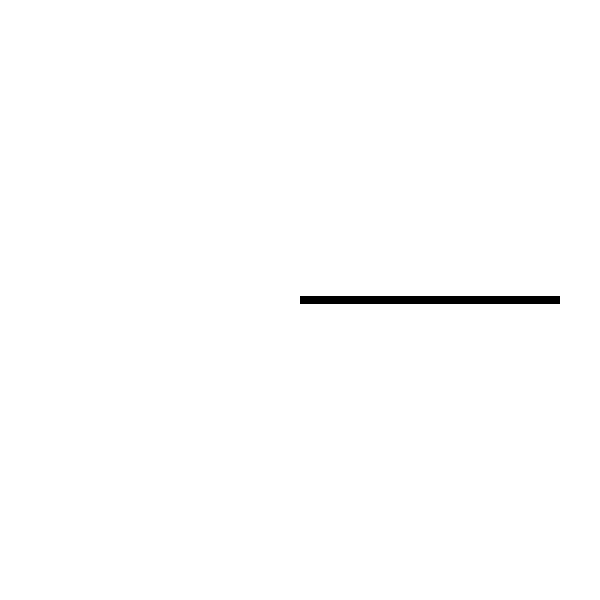
Next, make the ray a procedure and repeat it 36 times, turning 10 degrees between rays. Since 36 × 10 = 360, the rays go all the way round.
%!PS
%%BoundingBox: 0 0 300 300
% Step 2: a procedure for one ray, repeated with a turn between rays.
150 150 translate
/ray { 0 0 moveto 130 0 lineto stroke } def
4 setlinewidth
36 { ray 10 rotate } repeat
showpage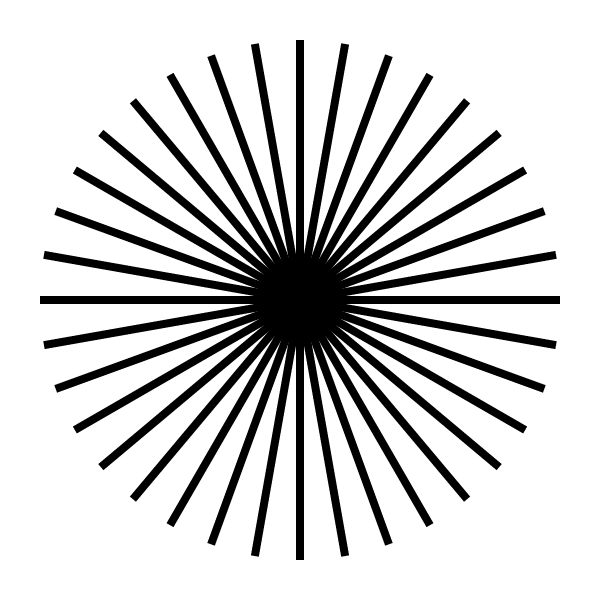
Last, use a for loop so that each ray knows its number
i. The number picks the ray's hue with sethsbcolor (hue,
saturation and brightness, each from 0 to 1), and whether it is even picks
the ray's length. setlinecap rounds the ends of the rays, and a
yellow disc covers the centre.
%!PS
%%BoundingBox: 0 0 300 300
% Step 3: colour each ray by its angle, alternate the lengths, add a sun.
150 150 translate
/ray {                      % length -> draws one ray along the x axis
  0 0 moveto 0 lineto stroke
} def
6 setlinewidth  1 setlinecap
0 1 35 {                    % i = 0 ... 35 is on the stack
  dup 36 div 0.8 1 sethsbcolor
  2 mod 0 eq { 140 } { 100 } ifelse ray
  10 rotate
} for
1 0.85 0.2 setrgbcolor
0 0 40 0 360 arc fill
showpage
Try changing the number of rays, the turn, or the colours. If a change breaks the program, the playground shows the error and the line it happened on.
Where to go next
- Open the playground and pick one of its longer examples from the menu: fractals, spirals and a type specimen.
- Read the source of the pieces in the gallery. Each one is a single PostScript file.
- pscat comes with libraries for art, charts, handwriting and page
layout, all written in PostScript. The guides
show what they can do, and the fonts page shows
every face you can pass to
findfont. - For every operator and every detail, see Adobe's PostScript Language Reference (the PLRM), and for style, the books in the reading list.